
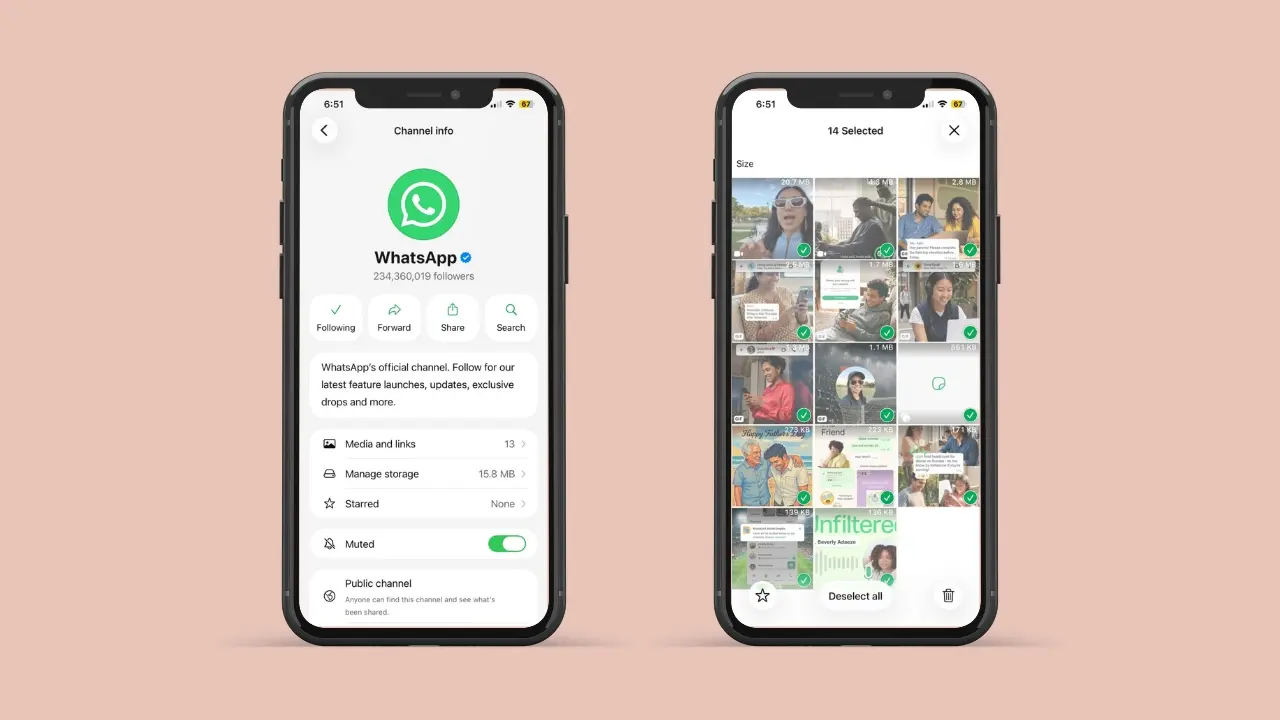
WhatsApp is rolling out a new feature to help users manage channel storage. With this feature, you can delete unnecessary channel photos, videos, and documents. This is a very useful update, especially for users who have limited storage on their phones.
The update is available on Android with WhatsApp beta for Android 2.26.30.4, which is the compatible version. It is currently available only in the beta version and is expected to roll out to everyone in the coming days.
How Channels Are Different From Chats
Channels work differently than regular chats. A channel is a one-way feed you follow. The channel owner posts updates, and you simply receive them. You cannot reply in the same way you would in a group chat.
Because of this setup, media from channels behaves differently too. Every photo or video an admin posts gets saved to your phone right away. Over weeks, this adds up much faster than most people expect. That is exactly why a cleanup tool made just for this makes sense.
Why Channel Storage Fills Up So Fast
Channels share photos, videos, stickers, and voice notes often. Because of this, storage use grows in the background. Most people don’t notice at first. Then, one day, their phone runs low on space.
For example, a channel that posts daily news can save many files each week. As a result, your gallery fills up fast. You get no warning at all. Voice notes and stickers add up too, even though people often forget about them. This is the exact gap that WhatsApp wants to close.
Here is why this happens so easily:
- Photos and videos from channels save to your phone by default
- Busy channels often post several times a day
- Over time, this media adds up quietly
- Deleting files one by one takes real time and effort
- Most users only notice once storage is already low
Two Simple Ways to Clean Up Channel Media
WhatsApp built two paths to this new tool. So, you get more than one way to manage your phone. Pick whichever feels easier for you.
From the channel info screen, you can:
- Review the media saved from that one channel
- Filter files by type before you delete them
- Choose from photos, videos, stickers, and voice notes
- Target the files taking up the most space first
- Skip the file types you still want to keep
From the Updates tab, you can instead:
- Tap and hold a channel to select it
- Open the menu and choose Clear media files
- Pick several channels at the same time
- Clear all of them together in one step
- Save time if you follow many active channels
Your Starred Messages Stay Safe
One common worry with any cleanup tool is losing something important. Thankfully, WhatsApp planned for this too.
If you starred an update from a channel, it stays put. It will not get deleted during a cleanup. This is true even when you clear all other media from that channel. So, you can clean up freely. There is no need to worry about losing updates you wanted to keep.
Who Can Try This Feature Right Now
This tool is rolling out through the WhatsApp beta app. It works on Android version 2.26.30.4. You can find it on the Google Play Store. However, it is not open to everyone just yet.
WhatsApp is rolling this out slowly. The company is testing it with a small group first. This is normal for beta apps. Teams often turn on a new feature for a few users before opening it to everyone. That way, they can catch bugs early and fix them fast.
So, if you install the update and still don’t see it, don’t worry. It should reach more people soon. Also, some users may already have access. This can happen through an earlier beta version. WhatsApp often turns features on step by step, even after the code goes live.
There is no word yet on when this reaches the stable app. Still, storage seems to be a bigger focus for WhatsApp right now. The company is also working on its own backup cloud provider for iOS users. So, this cleanup tool may just be one part of a larger plan.
What This Means for You
Overall, this update is a welcome fix. Anyone tired of storage warnings will likely agree. Channels are a growing part of how people use WhatsApp. So, letting media pile up was never going to work for long.
Once this feature reaches everyone, cleanup should take seconds, not minutes. And since starred messages stay safe, there is little risk in trying it. For now, keep an eye on your app updates. This tool looks ready to reach more phones soon.
People with older phones will likely notice the biggest difference. Older devices often start with less storage space. So, every gigabyte saved matters more on these phones. If your device often shows a storage warning, this update could bring quick relief.
A Small Fix With a Big Impact
Storage problems are one of the most common complaints among phone users. Yet the fix is often simple, and this update proves that point well. WhatsApp did not need to rebuild the whole app. It just needed to give users better tools to manage what already exists.
If you use channels a lot, this update is worth watching closely. Try checking your channel info screen after your next app update. Also, check the Updates tab, just in case the option shows up there first. Either way, your phone storage may thank you soon.
This is also a good reminder that useful updates do not need to be hard to build. Often, small tools end up making the biggest daily difference. A simple filter and a clear button can save real time each week. And if you follow several busy channels, that time adds up fast.