
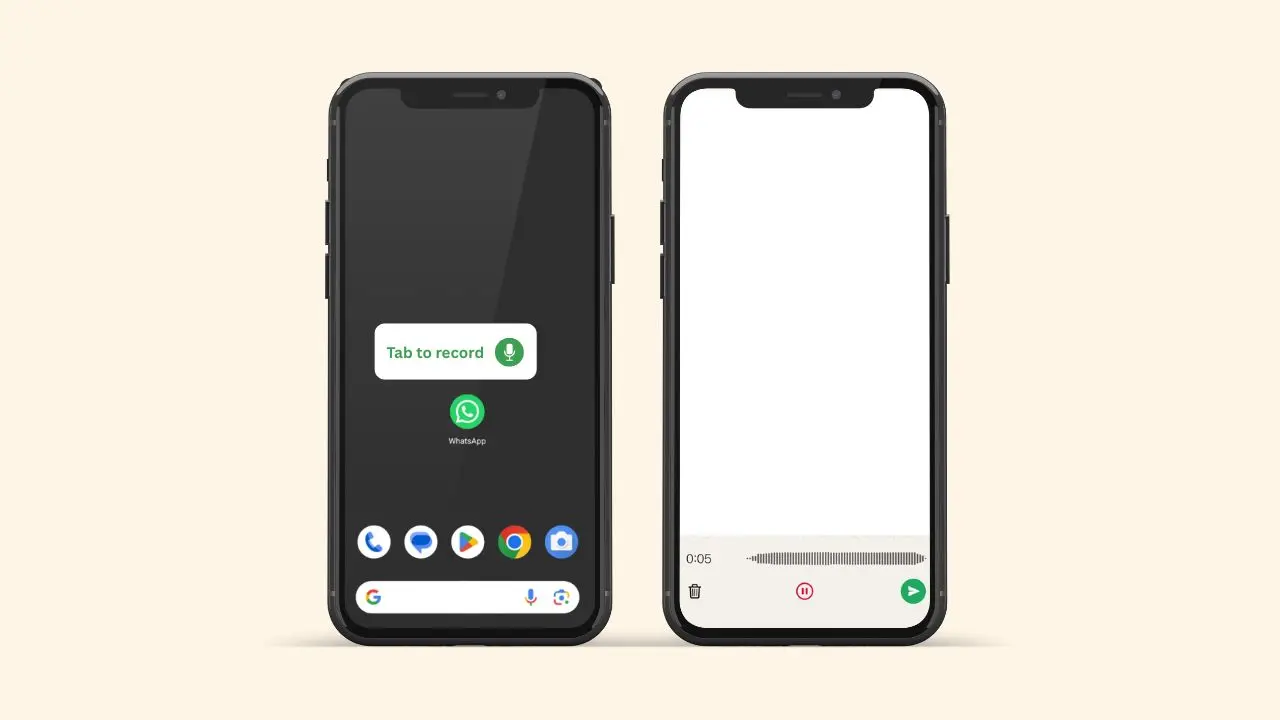
WhatsApp is rolling out a new feature on Android that allows users to record and send voice messages to one or multiple friends. For this, users no longer need to follow the previous process of opening a chat, recording the voice message, and then sending it. That process was very time-consuming. Now, with the help of a home screen widget, users can record a voice message without opening a chat.
This update is live in WhatsApp beta for Android 2.26.30.2, and it should reach everyone soon. If you want early access, you can join the WhatsApp beta program and update the app to the latest version.
What This Widget Actually Does
This widget is a shortcut that will be available on the home screen. Instead of scrolling through your chat list and opening one contact, you tap the widget and start chatting right away. Here is what it includes:
- A direct recording screen, no chat needed.
- Options to pause and resume while recording.
- A way to discard a note and start over.
- One recording that you can send to more than one person at once.
That last point is really perfect. Before this, sending the same voice note to five friends meant recording it once, sending it, then forwarding it four more times. Now you record once and choose everyone at the same time.
Setting Up the Widget on Your Home Screen
WhatsApp does not add this widget on its own. You have to set it up yourself. First, long press an empty spot on your home screen. Then open the widget menu. Next, look for WhatsApp in the list. Finally, drag the voice note widget onto your screen.
The widget comes in a compact size by default, roughly the size of three normal app icons side by side. However, you can resize it once it is placed. You can also move it anywhere on your screen, next to your calendar, weather, or clock widgets. If you barely send voice notes, you probably will not need it. But if voice notes are your go-to way of chatting, this widget could save you real time every single day.
It is worth noting that WhatsApp will not force this widget on anyone. Nothing changes inside your normal chats. The app icon still opens the same way it always has. This widget is simply an extra option sitting on your home screen, ready whenever you need it.
What Happens When You Tap the Widget
Once the widget sits on your home screen, using it is simple. Tap it, and WhatsApp opens a fresh recording screen instead of a regular chat. From there, you can:
- Start recording your message right away.
- Pause if you need a moment to think.
- Resume recording when you are ready again.
- Discard the clip and try again if you mess up.
- Confirm the note once you are happy with it.
After you confirm, WhatsApp shows a contact picker. This is where you choose who should get the message. You can pick one person or several. Then WhatsApp sends the note to everyone you picked, all at the same time.
Why This Small Change Actually Matters
Voice notes are already a big part of how people use WhatsApp. Many people find typing slow, especially when explaining something long. As a result, they just record a message instead.
The problem is speed. Right now, sending the same message to several people takes extra steps. You record it, send it, then forward it again and again. That is a lot of tapping for something that should feel quick.
This widget removes those extra steps. You record once and send to everyone at once. For parents in group chats, coworkers sending updates, or friends planning a trip, this could save a few minutes a day. Small time savings like this add up fast.
Think about a small business owner who sends the same voice update to ten customers every morning. Or a teacher who records one note for every parent in a class. In both cases, the old way meant repeating the same steps again and again. With this widget, that same task takes a few seconds instead of several minutes.
WhatsApp Wants You to Notice the Widget
Most people never open the widget picker on their phone. Because of this, many useful widgets go unnoticed for months. Some never get discovered at all.
WhatsApp seems aware of this problem. After you record a voice note in a normal chat, the app now shows a short notice. It tells you that a widget exists for recording voice notes faster. This notice appears right inside your conversation. So it is hard to miss if you send voice notes often.
Who Can Try This Right Now
This widget is part of a beta update for WhatsApp on Android. It rolled out through the Google Play Store, and for now, only a small group of testers has it. We covered an earlier version of this widget about a month ago, so WhatsApp has clearly been refining it behind the scenes before this release.
If you do not see it yet, do not worry. WhatsApp usually expands features like this slowly. This gives the company time to fix bugs and smooth out rough edges. WhatsApp has not shared an exact date for a full release. That said, the update moved from an early test into a working widget in about a month. So a wider release may not be far off.
The Bottom Line
This is a simple update, but it solves a real problem. You no longer need to open WhatsApp, find a chat, and record a note just to say something quick. Instead, you tap a widget, speak your message, and send it to whoever needs to hear it.
If you already have the WhatsApp beta, check your widget menu. You might already have access. And if not, keep an eye on future updates. This feature looks close to reaching everyone.
At the end of the day, this is not a flashy redesign. It is a small, practical fix for a task that many people do every single day. And sometimes, those small fixes end up being the ones people use the most.