
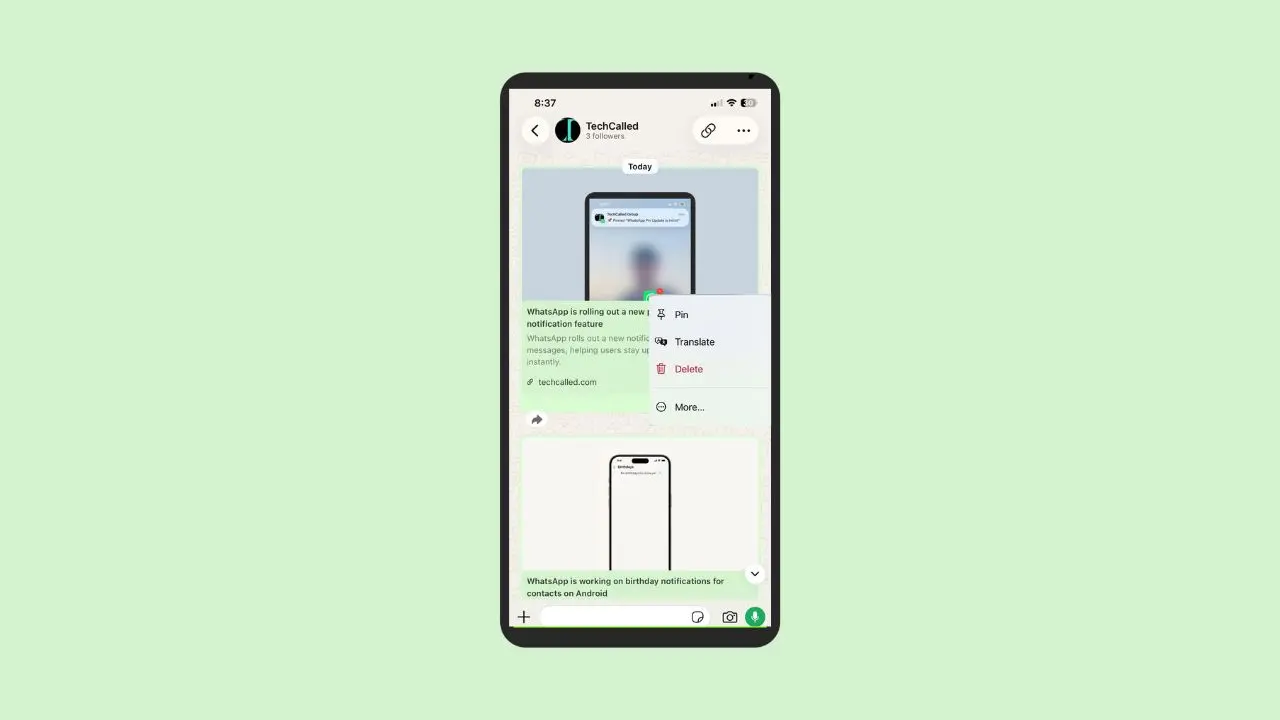
WhatsApp is testing a new feature for channel admins. Soon, they may be able to pin one update at the top of their channel. This means followers can always find that post, even after new updates arrive. Right now, this feature is still in development on iOS. WhatsApp has not made it available for beta testing just yet. Still, it gives us a clear look at what WhatsApp has planned next. Channel admins often share many updates in a single day. A pin could help their best post stand out from the rest.
Let’s look at how it works, and why it matters.
Pinning Already Works in Chats and Groups
Pinning is not a brand-new idea inside WhatsApp. In fact, the app already lets people pin messages in personal chats and group chats. This update simply brings that same idea to channels.
Pinning is not new on WhatsApp. People already pin messages in personal chats and group chats, and WhatsApp recently added pinned message alerts so nobody misses them. This update just brings that same idea to channels.
Here is how pinning works today:
- Users tap and hold a message, then choose “pin” from the menu.
- After that, the message stays at the top of the chat for everyone.
- People can pin a message for 24 hours, one week, or 30 days.
- In groups, admins decide if all members can pin messages, or only admins.
- In one-on-one chats, both people are able to pin messages.
Overall, this feature helps people find key details fast. Instead of scrolling through old messages, they simply look at the top of the screen.
Now WhatsApp Wants to Bring Pinning to Channels
Channels work a bit differently from chats and groups. WhatsApp has been busy on the group side too, recently testing a way to share chat history with new members. But until now, channel admins could only post updates one after another, with no way to make one stand out.
However, that is about to change. Once this feature arrives, admins will be able to pin a single update inside their channel. As a result, the update stays at the top, even as new posts come in.
For example, this could help channels that post often, like news pages or fan accounts. Sometimes, an important message gets buried fast inside a busy channel. With pinning, admins can make sure their followers notice it.
We spotted this feature inside a WhatsApp beta for iOS. The version number is 26.27.10.70, and you can grab it right now on TestFlight.
How Admins Will Pin an Update
Pinning a channel update will likely work a lot like pinning a chat message. Here is how the process should go:
- The admin taps and holds the update they want to pin.
- Next, they choose “pin” from the menu that pops up.
- WhatsApp then shows a quick alert about the 30-day pin limit.
- The admin taps yes, and the update jumps straight to the top of the channel.
This step exists to remind admins the pin will not stay forever. Followers will see the pinned update every time they open the channel. This happens on its own. Admins do not need to do anything else.
Pinned Updates Will Only Last 30 Days
Unlike pinned chat messages, admins will not get to pick how long an update stays pinned. Instead, WhatsApp sets one fixed limit of 30 days for every pinned channel update.
The pin will not last forever. After 30 days pass, the update will unpin on its own. Admins won’t need to remove it by hand.
This limit likely exists for good reason. Without it, channels could end up with old pins that nobody cares about anymore. Therefore, a fixed time limit helps channels feel fresh and current.
Admins Can Also Unpin Early
Even though 30 days is the max, admins are not locked into that timeline. If they want to unpin an update sooner, they can do that at any time.
The same menu used to pin an update offers an unpin option, too. So, if the update is no longer needed, admins can remove it early with just one tap.
To find an older pinned update, admins simply tap on it at the top of the channel. This takes them straight to that post. From there, they can unpin it for all.
What Followers Will Notice
For followers, this change is simple to understand. An admin pins the update, and it sits right at the top of the channel. Followers do not need to do anything extra to see it.
The pinned update stays at the top, even after a few days pass. This works well for channels that share a lot of updates in a short time. Without pinning, a key post could slip far down the page within hours.
For anyone who follows busy channels, this feature could make key posts much easier to find.
Why This Feature Could Be Helpful
Pinning gives channel admins more control over what followers see first. For instance, it could help with:
- Sharing important news right away.
- Highlighting a new product or update.
- Making sure an urgent message does not get lost.
- Keeping simple rules or links in easy reach.
Many public figures, brands, and news pages already run channels on WhatsApp. For these accounts, a pinned update could work well. It could hold pinned rules, pinned links, or big news that matters most to followers. It saves followers time too. They do not need to scroll back to find older posts.
Without this feature, an important post could disappear fast inside a busy channel. With it, admins can keep a post at the top for up to 30 days.
In short, it is a small feature. Yet it gives admins a simple way to guide what followers notice.
When Will This Feature Launch?
Right now, this feature is still being built. Beta testers cannot try it yet, even though it already appears inside the app’s code.
So far, WhatsApp has not shared a release date for testers or the public. Once it comes out, more details should follow soon. Until then, we will keep watching for updates, and we will share news as soon as it appears.
For now, this remains one to watch. WhatsApp often tests features quietly before rolling them out widely. A slow start here would not be unusual. If you run a channel, this could soon become a handy tool worth trying.