
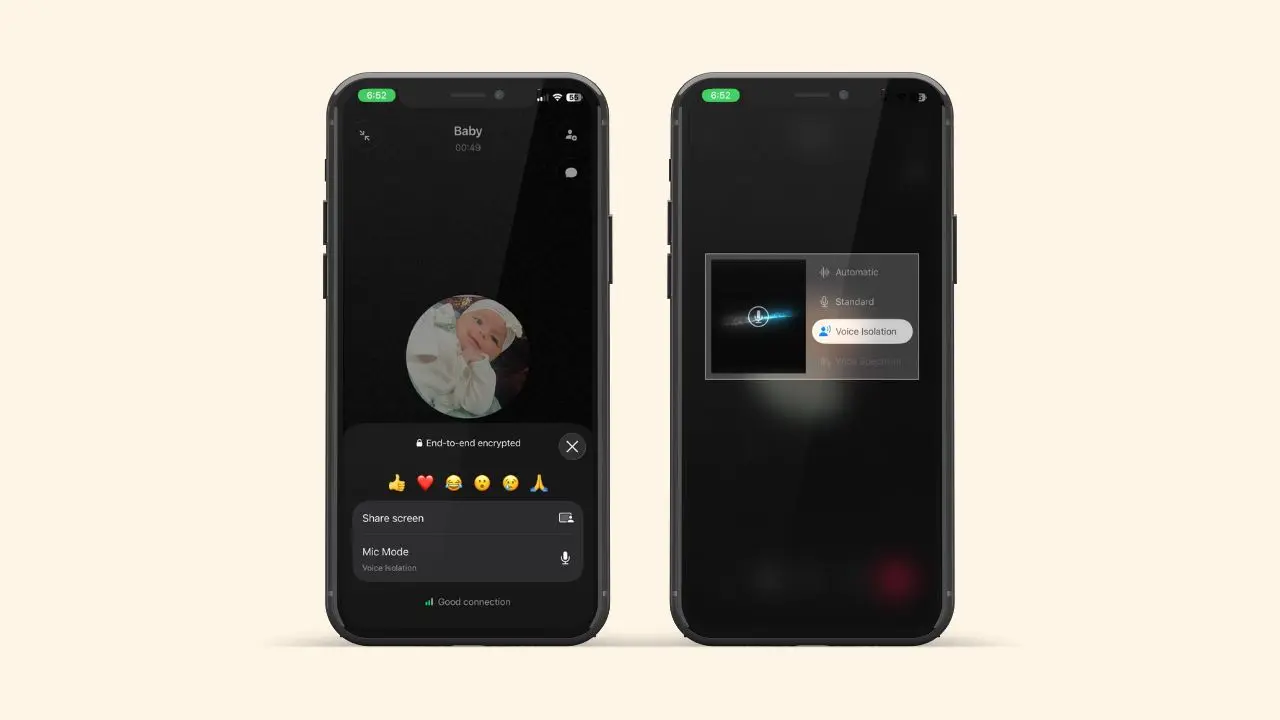
WhatsApp is rolling out a small but handy update for iOS users. Soon, a new button will show up right on your call screen. It lets you switch your mic mode without leaving the app. So, you can block out noise in WhatsApp while calling, or let it through, in just a couple of taps. This one small change could make a real difference on your next noisy call.
What’s Changing
WhatsApp did not build a brand new noise tool from scratch. Instead, it linked its call screen to a feature Apple already offers. Apple calls this feature “mic mode.” It has existed since iOS 15. However, it lived inside Control Center the whole time. So, most iPhone users never even noticed it was there. Now, WhatsApp is adding a shortcut inside the “More” menu during a call. Because of this, you can change your mic mode in just two taps. Plus, you can do it right in the middle of a chat.
This shortcut first showed up inside a WhatsApp beta version for iPhone. Beta versions often test new features before they reach everyone. So, this option may still change a bit before the final release.
Most iOS users already have this feature by now. If yours is missing it, just grab the latest update from the App Store.
The Four Mic Modes You Can Choose From
Apple gives you four mic modes to pick from. Each one changes how your phone handles sound during a call.
- Standard: the normal setting your phone uses by default.
- Voice Isolation: focuses on your voice and blocks out most background noise.
- Wide Spectrum: keeps all the sound around you, background noise included.
- Automatic: lets your iPhone pick the best mode and adjust it as the call goes on.
So, if you are walking down a loud street, Voice Isolation can help a lot. But if you want the other person to hear what is going on around you, Wide Spectrum works better instead. Meanwhile, Automatic is a safe pick for anyone who does not want to think about it at all.
A Few Everyday Examples
Think about a normal day. Maybe you take a work call from a busy coffee shop. Or maybe you talk to family while you walk the dog outside. In cases like these, Voice Isolation can clean up the noise fast. On the other hand, say you are on a video call at a family party. Then, Wide Spectrum lets the other person hear the fun in the room too. So, the best choice really depends on what you want people to hear.
How to Switch Mic Mode Mid-Call
Turning this on is simple once the update reaches your phone.
- Open WhatsApp and start or join a call.
- Tap “three dots” at the bottom of the call screen.
- Select “Mic Mode” from the menu.
- Choose the mode you want.
Your iPhone applies the change right away. Plus, it will not pause or drop your call while it switches. That means you can adjust your audio mid-sentence. The other person will not even notice a gap.
Your Setting Sticks Around
Once you pick a mode, you likely will not need to choose it again. Apple’s system remembers your last pick on its own. Then, it applies that same mode to your next WhatsApp call too. That way, if you set Voice Isolation once, it stays the same until you switch it yourself. This small detail saves time for anyone who takes calls in noisy spots often. After all, nobody wants to fix the same setting every single day.
Why WhatsApp Added This Now
Apple’s mic mode has existed for years. Yet, it never really caught on. To use it, you had to open Control Center, tap into audio controls, and then look for the mic mode option. That is a lot of steps just to fix noisy audio in the middle of a call. Because of this, most people simply never bothered to try it. In fact, many iPhone owners still do not know this feature exists at all. WhatsApp likely noticed this gap between the tool and its real use. As a result, the company chose to bring the option closer to where people need it most. That spot is the call screen itself.
Clear audio matters more than people think. A noisy call can make it harder to hear each other, and those little pauses to say “what?” add up fast. That’s probably why WhatsApp keeps shipping small fixes like this one, including a new voice message widget for the home screen.
iPhone vs Android: Not the Same Feature
Android users already got a similar upgrade, but the method behind it works differently. On Android, WhatsApp built its own tool to cut background noise. It runs inside the app itself. This tool works apart from the phone’s own system entirely. On iPhone, though, WhatsApp does not process any audio on its own. Instead, it simply makes Apple’s existing tool easier to find and use. The outcome feels similar either way. Both give you clearer calls with less background noise. However, what happens behind the scenes is not the same at all.
Both updates point to the same goal. WhatsApp wants every call to sound clear, no matter which phone someone uses. Plus, so many people now call through apps instead of a regular phone line. That makes clear audio matter even more.
Who Has It Right Now
This mic mode shortcut is showing up slowly across the App Store. Some iOS users already have it after updating to the newest WhatsApp version, while others might not see it yet. If your call screen does not show “Mic Mode” right now, don’t worry. WhatsApp tends to roll out iOS updates this way, much like it did with the green dot feature for online status, so it should reach more accounts soon.
You do not need to do anything special to check. Just open the App Store and look up WhatsApp. Then, tap update if one is ready. After that, open a call and look for the new button under “three dots.”
The Bottom Line
This update will not change how your calls sound on its own. It just puts a useful tool where you will actually see it. Before now, most people never even knew mic mode existed. Now, it sits right on the call screen, ready whenever you need it. That alone could help a lot of iPhone users have clearer, calmer calls going forward. And that is a nice little win for something so simple.