
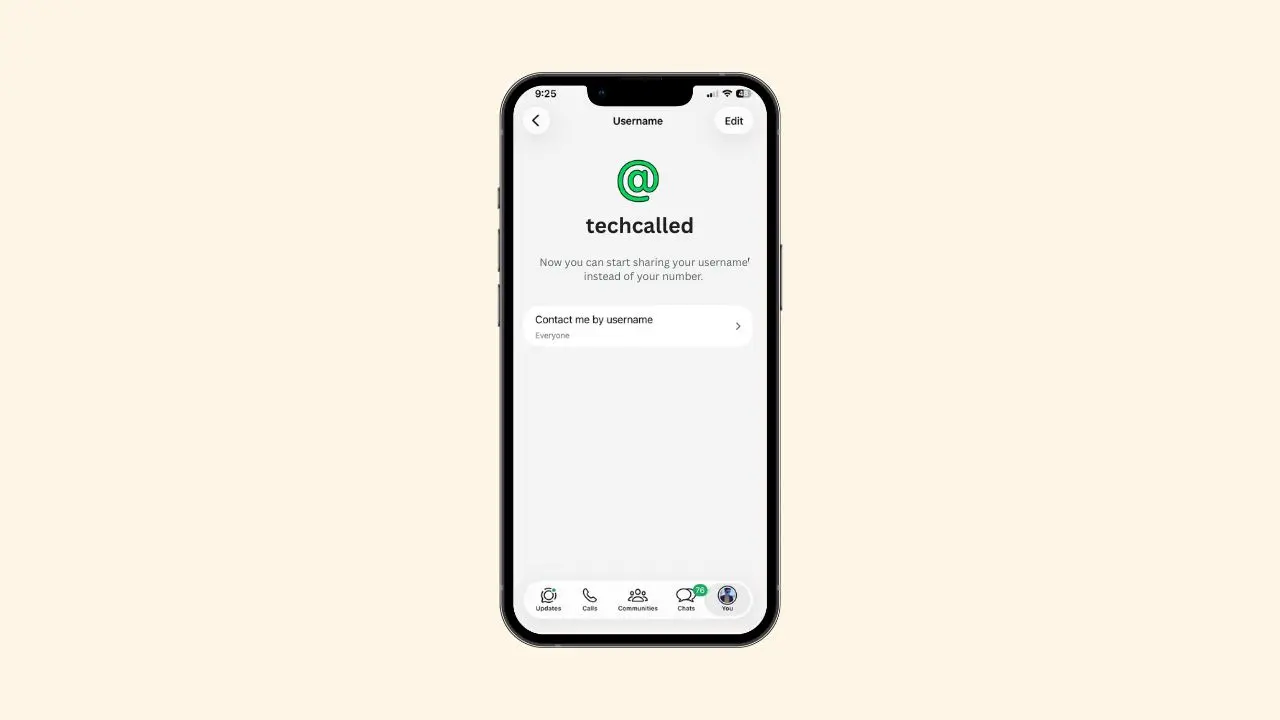
WhatsApp just turned on usernames for some users. These users can now chat with new people using a username. No phone number needed. Before this, people could only reserve a username. Now, a small group can finally use it.
Most people cannot use it yet. But this is the first real step toward everyone getting it soon.
What’s Changing Right Now
Only a few users have full access today. For these accounts, some things are now true:
- They can share a username instead of a number with new contacts
- Old chats still show phone numbers, just like before
- A username can be changed or removed at any time
- Removing a username brings the phone number back
Because this rollout is slow, most people still see the screen from our earlier username reservation piece. WhatsApp has not shared a date for the full launch yet.
This slow pace is not unusual. Big apps often test new features on a small group first. Then, they watch how things go before opening it up to everyone. This helps catch small bugs early. It also gives the WhatsApp team time to fix issues before millions of people join in.
How You’ll Know Your Username Is Live
If your account is part of this group, you will see a small banner. It sits at the top of your chat list. The banner tells you that your username is ready. It also reminds you that you can share it now.
This banner makes things easy to spot. You don’t need to dig through menus. But if you don’t see one yet, your account is likely not included yet.
Checking And Managing Your Username
You can also check your username by hand. Here’s how:
- Open WhatsApp settings
- Tap your profile at the top
- Look below your name for your username
- Tap it to edit or delete it
This works even without the banner. If a step feels unclear, WhatsApp’s help center breaks it down further.
What Happens When A Contact Sets Up A Username
When a contact makes or changes a username, WhatsApp adds a short note. It shows up right inside your chat with them. This note simply tells you the change took place. There is no separate alert for it. Instead, you will only see it once you open that chat.
The same kind of note also shows up in group chats. It sits inside the “member changes” screen. So it becomes much easier to spot someone after they switch names. This helps a lot inside busy group chats.
Phone Numbers Are Not Going Away
Even with usernames here, WhatsApp still needs your phone number to sign up. That part has not changed. Usernames just add a new way for people to reach you. This mostly helps with people you don’t know yet.
If someone already has your number saved, they will still see it. This stays true even after you add a username. On the other hand, new contacts who only know your username will see that instead. So both systems now work side by side. Neither one replaces the other.
For example, say you sell items online. Or maybe you message a business for the first time. Now, you can share just your username. This keeps your real number private. Yet it still lets people reach you with ease.
What This Means For Businesses
Small businesses often chat with many new customers on WhatsApp. Right now, this usually means sharing a phone number in public. That can feel a bit risky for some business owners.
With a username, this changes. A shop or a small brand can share a simple handle instead. Customers can still reach out with ease. Yet the business keeps its number private. This could make WhatsApp feel safer for people who sell things online.
Over time, this could also help business pages feel more like a normal profile. A clear username is often easier to remember than a long phone number. So customers may find it simpler to search for a business again later.
Why This Update Matters
Usernames bring WhatsApp closer to other chat apps. Many apps already let you message someone without a phone number. Now, WhatsApp is moving that way too. Even so, it keeps the number system in place. This helps people who still prefer it.
This balance matters a lot. Millions of people still rely on phone numbers for daily chats. So instead of a sudden switch, WhatsApp seems to ease users in slowly. This way, people can move at their own pace.
Many users also like this approach for privacy reasons. A phone number can feel very personal. A username feels more like a normal online name. So this small change could make people feel safer when they talk to strangers.
There is also a safety angle here. Scammers often collect phone numbers to target people with spam or fake offers. A username gives away far less. It cannot easily be linked back to other accounts or personal details. Because of this, some users may feel more at ease sharing a username with someone they just met online.
What This Means For You Next
If you already reserved a username, you don’t need to do anything yet. Your handle is safe and waiting for its turn. Meanwhile, if you have not reserved one, it may help to do it soon. Popular names could get taken as more people join in.
For now, just keep an eye on your chat list. Once that banner shows up, your username will be ready. Then, you can share it with anyone new, any time you like.
This update is still small in size. Yet it hints at a bigger shift ahead. So it may be worth checking your settings this week, just to see where things stand. That way, you won’t be caught off guard once your own username goes live.