
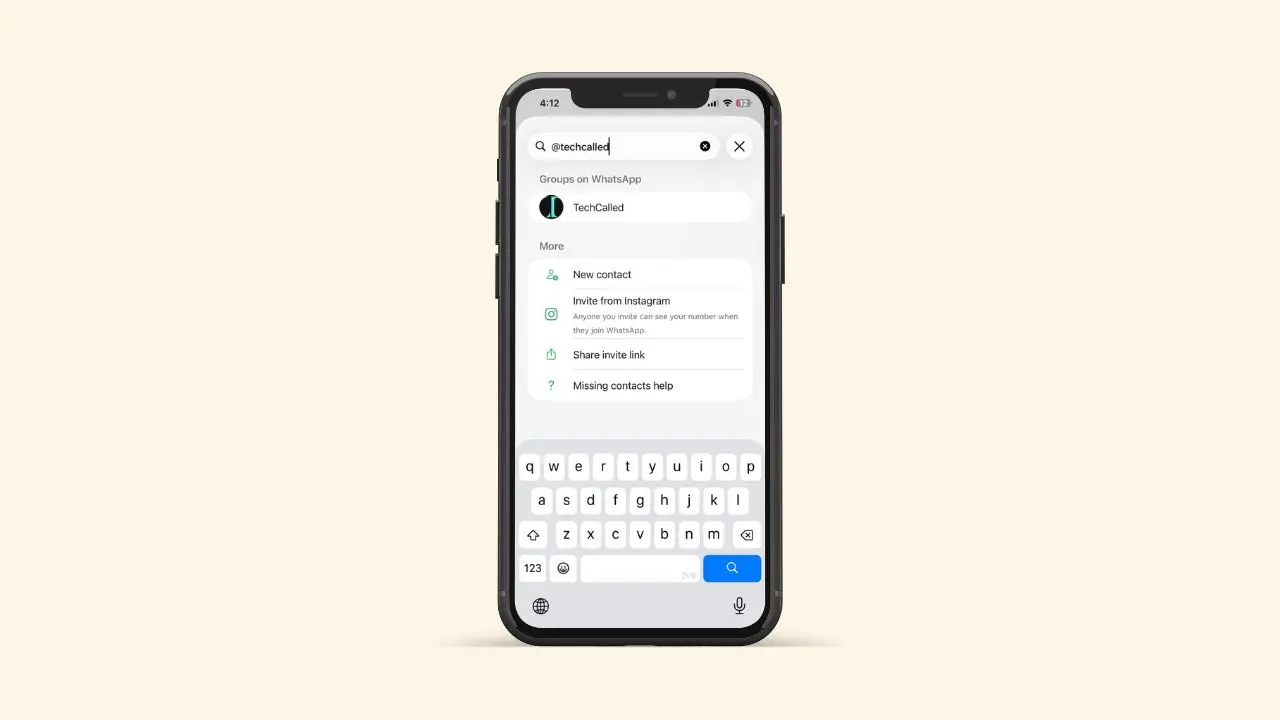
WhatsApp is rolling out a new way to contact people or businesses by using a username. You no longer always need their phone number to chat. You can search for their username and start chatting. This is a fairly big shift for a WhatsApp app that has always been built around phone numbers. This feature is still rolling out slowly, so it may not show up on your phone yet. But here’s exactly how it works once you do get access to it.
What You Need Before You Start
There are two things you need to have ready.
First, you need to know the person’s exact username. WhatsApp only shows a match when you type the full username correctly. So even one small typo means you’ll get no result at all.
Second, some people add an extra layer of privacy called a username key. If your contact has turned this on, you will need that key too. Without it, WhatsApp simply will not let the chat open.
Here’s a quick list of what to have ready:
- The person’s full, exact username like @techcalled
- Their username key, if they have set one up (4-digit)
- The latest version of the WhatsApp app
How to Start a Chat Using a Username
Once you have the username, starting a chat takes only a few taps. Open WhatsApp and go to the Chats tab. Then tap the new chat icon, the same one you’d use to message a saved contact. Next, tap the search bar at the top of the screen. Type the username exactly as the person shared it with you. If that username exists on WhatsApp, their profile will show up in the results. Now tap on their name to open the chat. You can start typing your message right away. No number needed.
What Happens If They Have a Username Key
Some people like extra privacy, so they set up a username key. Think of it like a password made just for their username. If the person you’re trying to reach has one, WhatsApp will stop you. It will ask for the key first. Type in the key, then tap Next. If it matches, the chat will open right away. If you don’t have the key, though, you’re out of luck for now. You won’t be able to message them this way. Not until they share that key through some other channel, like a text or a call.
What You’ll See Once the Chat Opens
Once the conversation opens, you’ll notice something right away. Their username sits at the top of the chat instead of their real name. That’s because you don’t have their number saved in your contacts. This can feel a little odd at first, since most chats show a saved contact name instead. If you do have their number saved already, you might see both. And here’s a nice bonus: you can look up someone’s username even if you already know their number. So this feature actually works both ways.
Why WhatsApp Is Adding Usernames
Other apps have used usernames for years. Telegram does it. Instagram does it too. So this move brings WhatsApp closer to that same idea. A phone number feels personal, and most people don’t want to hand it out to strangers. A username, on the other hand, feels safer to share in public. That’s likely why WhatsApp is testing this now. It could help small business owners. It could help creators too. Either way, it gives people a way to stay reachable without giving up their number.
How to Reserve Your Own Username
Even if you cannot search for other people yet, you might still be able to claim your own username early. Open WhatsApp and check your settings or profile page for a username option. If it shows up, grab a name before someone else takes it. After you set one, people can find you the same way you’d find them. All they need is the search feature. So it’s worth doing this step now, rather than waiting.
Tips If the Search Comes Up Empty
Sometimes a username search returns nothing, even when you are sure it is correct. Here are a few common reasons why:
- You typed the username with a small spelling mistake
- The person has not set up a username yet
- Your version of WhatsApp is outdated
- The feature has not rolled out in your region yet
If none of these fit, ask the person to double check their username. Then have them send it to you again, just to be safe. Most of the time, one of these small fixes solves the problem right away.
Staying Safe When You Use Usernames
Using a username instead of a number does not remove all risk. Still, it does add a layer of distance between you and someone you don’t know well. If you ever feel unsure about someone who reaches out, you can block them. You can also report them, just like any other contact. It also helps to keep your WhatsApp username separate from names you use on other public accounts. That way, people cannot easily connect the dots back to your real identity. This is a small habit. But it can go a long way if privacy matters to you.
A Few Things Worth Knowing
- This feature isn’t available to everyone yet. WhatsApp is rolling it out slowly, region by region.
- You can reserve your own username now, even before you can search for others.
- Usernames make it easier to stay in touch without handing out your number to strangers.
- This could help businesses, creators, or anyone who wants some distance between their number and their public profile.
In short, this update gives WhatsApp users more control over their own privacy. You get to decide who sees your number and who doesn’t. Meanwhile, you can still connect with new people using just a name. This puts WhatsApp in step with other apps that already work this way. It might take a while before this feature reaches your phone. Keep checking your settings in the meantime, since the rollout is ongoing. But once it does reach you, reaching someone new becomes a lot simpler, and a little more private too.