
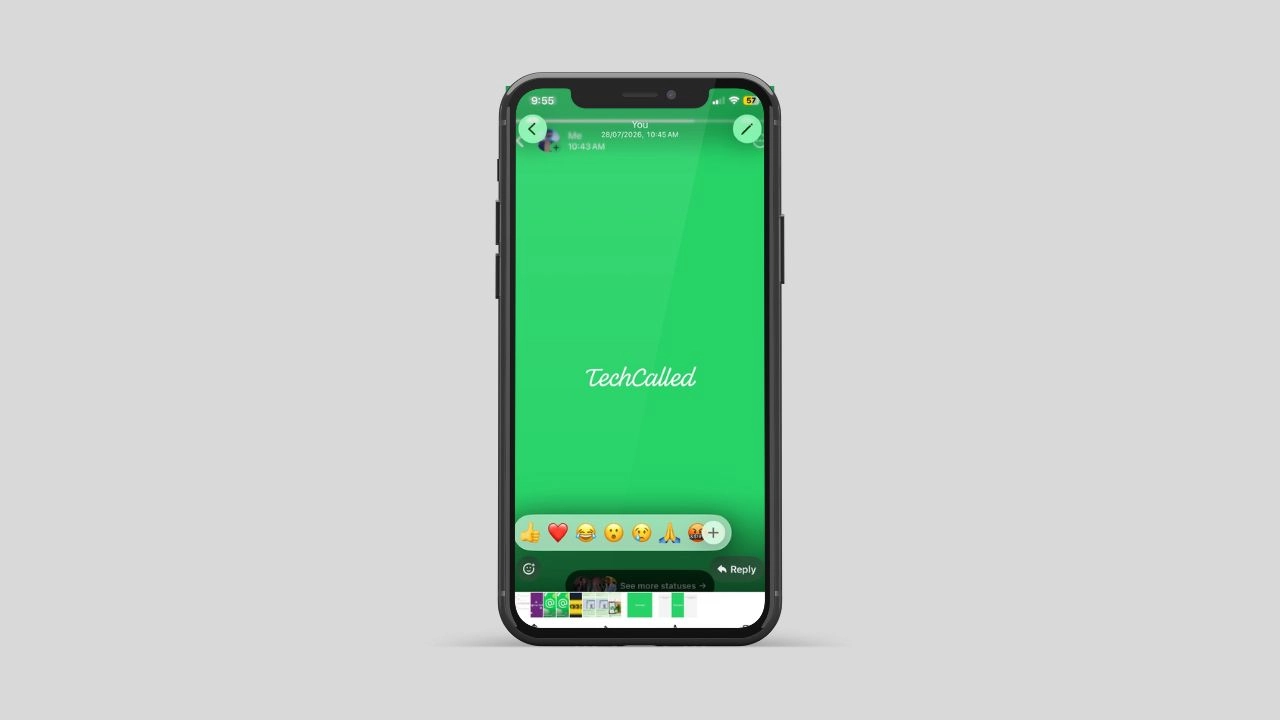
WhatsApp is testing a new feature for Android that lets users react to and reply to photos, videos, and status updates without leaving the full-screen media viewer. Previously, WhatsApp did not allow users to respond directly while viewing media in full screen. This new interface is expected to replace the current media viewer in a future update.
At the moment, the feature is available for testing in WhatsApp beta for Android 2.26.30.3 and is expected to roll out to more users soon.
What is changing in the media viewer
This update brings a few clear changes:
- A full reply bar sits at the bottom, just like a normal chat
- You can send text, photos, or voice notes without closing the photo
- Six reaction emoji show up at once, not just one
- A plus button opens the full emoji list if you want more choices
Together, these changes make the photo screen feel like a real chat window. That is the main goal here.
Why WhatsApp made this change
WhatsApp added small reply and react shortcuts back in 2024. Before that update, users had to close a photo first. They had to go back to the chat just to reply. That extra step slowed things down. It felt slow for people who share a lot of photos and videos.
The 2024 update fixed part of this problem. Users could tap one emoji or hit a small reply button. They did not need to leave the screen for that. Many people send several photos back-to-back during a normal chat, one right after another. Still, the design had limits. If a user wanted to say more than a quick reaction, they had to leave the photo screen anyway.
This new redesign closes that gap. The photo screen now works almost like the main chat. Users no longer lose their spot or their thought halfway through a reply.
How the new reply bar works
Once this update reaches your phone, a photo or video will look mostly the same at first. But the bar at the bottom is different now.
Instead of one small button, you will see a full chat bar. You can type a message. You can attach a file. You can record a voice note as well. All of this happens without closing the photo. This bar works just like the one in your normal chats. There is nothing new to learn here.
This small change matters more than it sounds. Picture the last time a friend sent five holiday photos in a row. In the past, you had to close each photo. You had to go back, type a reply, and open the next photo again. Now, you can just stay on the photo and type your reply right there instead.
Reactions also get a nice boost
Reactions are getting an upgrade too. In the older design, the photo screen only showed one quick emoji. If a user wanted a different reaction, they had to open the full emoji list.
With the new design, you get more choices right away:
- Two emoji appear right away for fast taps
- A full row of six emoji is just one tap away
- The plus button still opens the full list if none of those fit
As a result, you end up tapping less overall. It also feels more natural, since it matches the reaction tray already used in normal chats. WhatsApp is separately working on custom emoji reactions too, so the reaction tray may get even more choices soon.
Who can try this feature right now
This redesign is part of the WhatsApp beta app for Android, version 2.26.30.3. You can join the beta testing program to try it yourself, though it’s not open to everyone yet. Only a small group of testers can see it at the moment.
WhatsApp often rolls out updates like this slowly. More people should get access over the next few weeks. If you use the beta app and do not see the new reply bar, do not worry. It simply has not reached your account yet.
There is also no word yet on when this reaches the main app. Most people use that version, not the beta one. WhatsApp often tests new features for weeks. Sometimes it takes months before everyone gets the update.
A pattern in how WhatsApp builds new features
This is not the only part of the app getting closer attention lately. Chat lists, voice messages, and status updates have all seen small tweaks this year. Group chats and channels received small design updates too. WhatsApp tends to test changes in small steps. It watches how beta users respond first. Then it slowly widens the update if things go well. The media viewer redesign fits that same pattern closely.
Why this small update actually matters
At first, this might look like a tiny design change. It fixes something people deal with every single day, though.
Photos and videos are a huge part of how people talk on WhatsApp. Maybe it is a family photo. Maybe it is a funny clip from a friend. Replying to these files happens all the time. Having to leave the screen just to say something back always felt like an extra step. Nobody really asked for that step in the first place.
This update removes that step completely. On top of that, it makes the photo screen feel like one connected space. It no longer feels like a separate screen stuck onto the chat.
What to expect next
For now, keep an eye on your WhatsApp beta updates if you want to try this early. Make sure your app stays updated through the Google Play Store. That is where this test build is showing up at the moment.
If you are not part of the beta program, do not worry. You will likely see this change later on. WhatsApp tends to release features widely once it feels fully ready. Either way, replying to photos and videos on WhatsApp is about to feel a lot smoother for everyone.