
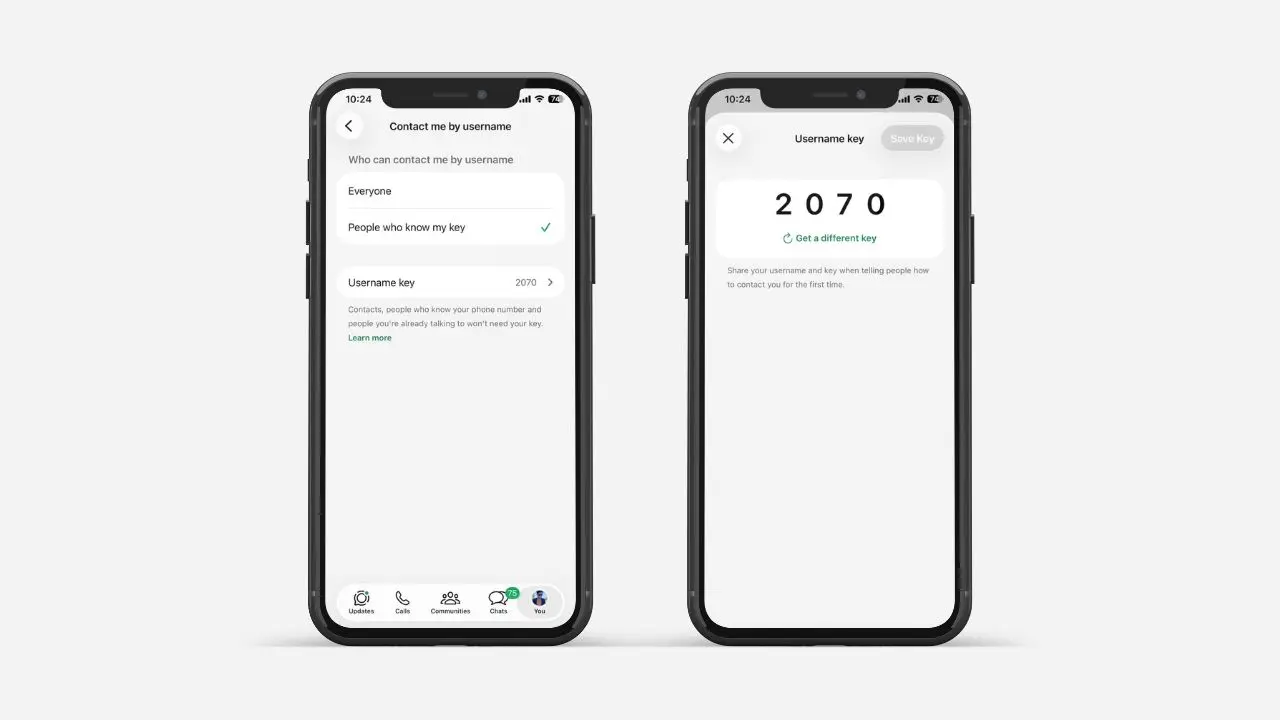
WhatsApp just added a new safety feature called the username key. This short key adds one more layer of safety. It comes into play when someone tries to message you by using your username for the first time. Once you turn it on, strangers need your key first. They must have it before they can start a chat with you. People who already know you can still message you. They do not need any extra steps.
This feature is part of WhatsApp’s big move toward username-based chats. Right now, the rollout is still limited. So, not everyone will see this option in their app yet. In the meantime, you can still reserve your username. This way, you’ll be ready once the full feature reaches your account.
Below, we’ll walk through what a username key does. We’ll also cover how to turn one on, and how to share it the right way.
What a Username Key Really Does
Right now, most people on WhatsApp still rely on phone numbers to reach each other. Usernames are changing that. You can already find someone by username instead of asking for their number. But that same ease also opens the door to messages from total strangers, and that’s the exact gap the username key is meant to close.
A username key does not block people you already know. Instead, it is built for unknown person. It is for people who have never messaged you before. Here’s when you do not need to share your key:
- If they already have your phone number
- If you’ve chatted with them before
- If you’re both in the same group chat
- If they scanned your QR code
- If they messaged you first, before you turned the key on
So, in short, the key only covers brand-new contacts. It only applies when someone tries to reach you through your username for the very first time. Everyone else can keep messaging you like normal. As a result, this feature works more like a filter. It is not a wall between you and the people you want to talk to.
How to Turn On Your WhatsApp Username Key
Setting up a username key is easy. But there is one catch. You can only manage it from your phone right now. WhatsApp Web and the desktop app do not support this feature yet.
Here’s how to turn it on, step by step:
- Open WhatsApp on your phone
- Go to Settings, then tap Account
- Select Username
- Turn on the username key option (People who know my key)
Once you do this, WhatsApp will create the key for you. It happens on its own, so you cannot pick your own code. This keeps things simple and fair for everyone. However, if you don’t like the key you get, you have another option. Just tap “Get a different key,” and WhatsApp will make a new one right away.
Sharing Your Key the Right Way
After you create your key, share it along with your username. This part matters a lot. Without the key, new contacts will not be able to message you at all.
Here’s the tricky part: WhatsApp will not warn you when someone fails to reach you. So, if you forget your key, that person may just think you’re ignoring them. In reality, they simply could not get through.
Because of this, it helps to build a small habit. Always send your username and key together. Do this whenever you meet someone new. For example, you might text both to a new friend. Or you could share them at the same time on a business card. That way, things stay clear later, and no one gets left hanging.
Updating or Removing Your Key
Your username key can always change. You can update it, or turn it off, any time you want. Just go back to the same settings screen where you first made it.
Here’s what happens after a change:
- Old chats stay the same
- People you’ve already messaged can still reach you, with no extra steps
- Only brand-new contacts will need your latest key
One more thing worth knowing: some accounts get the key turned on by default. This happens if your account is linked to a Meta account that shows you’re under 18. That said, you can turn it off later, if you want a different setup.
How This Fits Into WhatsApp’s Bigger Privacy Push
This update does not stand alone. Over the past year, WhatsApp has added several privacy tools, such as chat locks and silent exits from group chats. The username key fits right into that same pattern. It gives people one more way to guard their space, without losing the ease of chatting with friends and family. Meanwhile, other apps have offered similar controls for a while now. So, in some ways, WhatsApp is simply catching up to where messaging privacy is heading.
Why This Small Feature Matters
At first, a username key might feel like a tiny setting. It is easy to miss inside your app. However, it solves a real problem. As WhatsApp opens up usernames to more people, strangers will reach out more often. Without a filter, that could mean lots of random messages from people you don’t know.
With a username key turned on, you stay in control. You decide who gets access. You also decide when to share it. Meanwhile, your old chats stay the same, and nothing changes for the people already in your life.
This is still an early feature, and WhatsApp is rolling it out slowly. So, don’t worry if you don’t see it in your app yet. It should reach more users over time. Until then, reserving your username is a smart first step. This way, you’ll be ready the moment the full feature arrives.
Overall, the username key is a small but smart addition. It gives WhatsApp users one more way to stay safe. And it does this without making things harder for the people they already trust.