
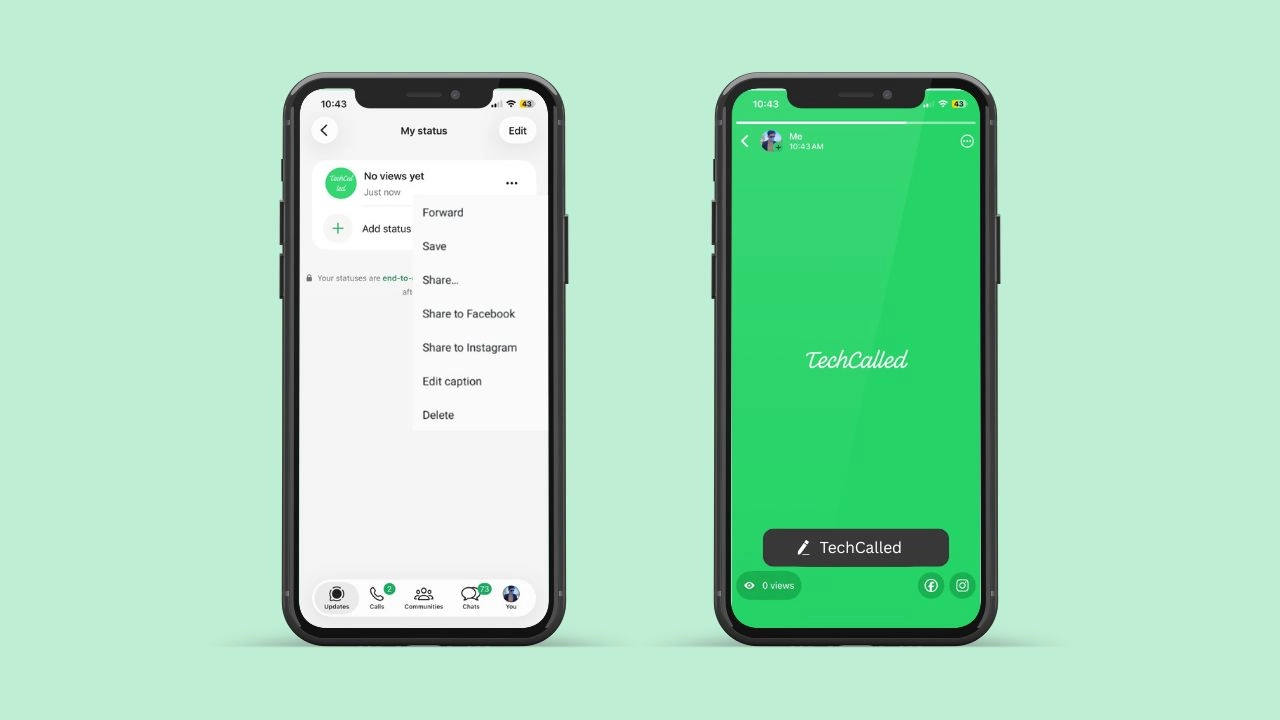
WhatsApp is rolling out an update that lets you edit your status caption on Android. No deleting. No reposting. Just a quick fix. Then you move on.
This update is live for some Android beta testers right now. It may take a few weeks to reach everyone else. Still, it is a small fix. But it solves a real headache for daily users. Anyone who posts a status often will know that feeling. You hit send, then you spot the mistake a second later.
What Is Actually Changing
Before this update, a typo meant real work. You had to delete your status. Then you had to post it again. You had to type the caption again too. That cost time. It also reset your view count. So people who saw it once had to see it again.
Now, none of that is needed. You just tap edit. You fix the words. Then you save. Your status stays right where it was. Nothing gets deleted. Nothing gets reposted. Even the view count you already earned stays untouched.
This might sound small. But if you post often, it saves real time. It also saves real frustration. A quick typo fix should not feel like a chore.
Two Places to Find the Edit Option
WhatsApp built this feature into two spots. So you have a good shot at finding it. It does not matter how you use the app, or which one you check first.
- Go to your status list. Tap the three-dot menu next to any update. You will see “Edit caption” right there.
- Open the status itself. A small pencil icon sits next to your caption. Tap it. The edit screen opens.
Because there are two options, most people will notice this fast. Also, the pencil icon is hard to miss. Even if you skip menus, you will likely spot it. This works whether your status is a photo, a video, or plain text.
You Get 15 Minutes to Make Changes
Here is the catch. Once you post your status, the time starts. You have only 15 minutes to fix the caption. After that, the edit option disappears.
This matches WhatsApp’s rule for chat messages. So if you already edit texts often, this timing will feel familiar. It keeps the rules simple across the whole app.
Because the window is short, check your caption right after posting. Fix any typo fast. Otherwise, you will need to delete the update. That is the only way to remove the mistake once time runs out.
Nobody Will Know You Edited It
When you edit a chat message, WhatsApp shows an “edited” label. Everyone in the chat sees it. However, status captions work differently.
If you fix a typo, viewers see no sign of the change. The next time someone opens your status, they just see the new words. There is no label. There is no notice. There is no history of the old caption.
This keeps things simple. It also keeps things private. Nobody needs to know about a small spelling slip. Meanwhile, your status still looks clean to anyone who checks it. Small edits stay between you and your keyboard.
Who Can Use This Feature Today
This option is part of WhatsApp beta version 2.26.30.1 for Android. To try it out, you can join the beta program on the Google Play Store, then wait for the update to arrive.
Even then, not everyone gets it right away. WhatsApp is rolling this out slowly. It is testing with a small group first. So some testers already have access. Others are still waiting their turn.
A few users outside the beta program have also spotted this option. This hints that a wider rollout may already be underway. Still, WhatsApp has not shared a clear date for the full release. As always, these things tend to spread step by step.
Why This Small Fix Actually Matters
At first glance, caption editing seems minor. But think about how often people post updates. Some people share a status every single day. This one fix solves a daily annoyance for a lot of users.
- You keep your original view count.
- You skip typing your whole caption again.
- You fix mistakes in seconds, not minutes.
Plus, nobody sees an “edited” tag. So you can fix small slips quietly. Nobody needs to notice, and nobody will ask questions.
For creators and business accounts, this helps even more. Posting the same update twice, just to fix one word, feels wasteful. Now, that extra step disappears completely. That means less time spent redoing work, and more time spent on other things.
Status updates already come with tools like reactions and a list of who viewed them. Caption editing simply adds one more small piece to that puzzle. Together, these tools make status updates feel less like a one-shot post and more like a normal part of daily chatting.
What Comes Next for WhatsApp Users
WhatsApp keeps rolling out small features. Each one makes daily use easier. This caption edit option is just one part of that effort. Because it is still in beta, small details might shift. Changes could happen before the full release.
For now, check your status menu if you are in the beta program. You might already have this option without knowing it. While you wait, it’s also worth learning how to manage your username key, since that setting shapes how people find your account too.
In the meantime, double check your caption before you hit post. That way, you avoid the wait altogether. Once this feature reaches your account, fixing a typo will finally feel quick and easy. A tiny update like this one shows how much small details matter in an app people use every day.