
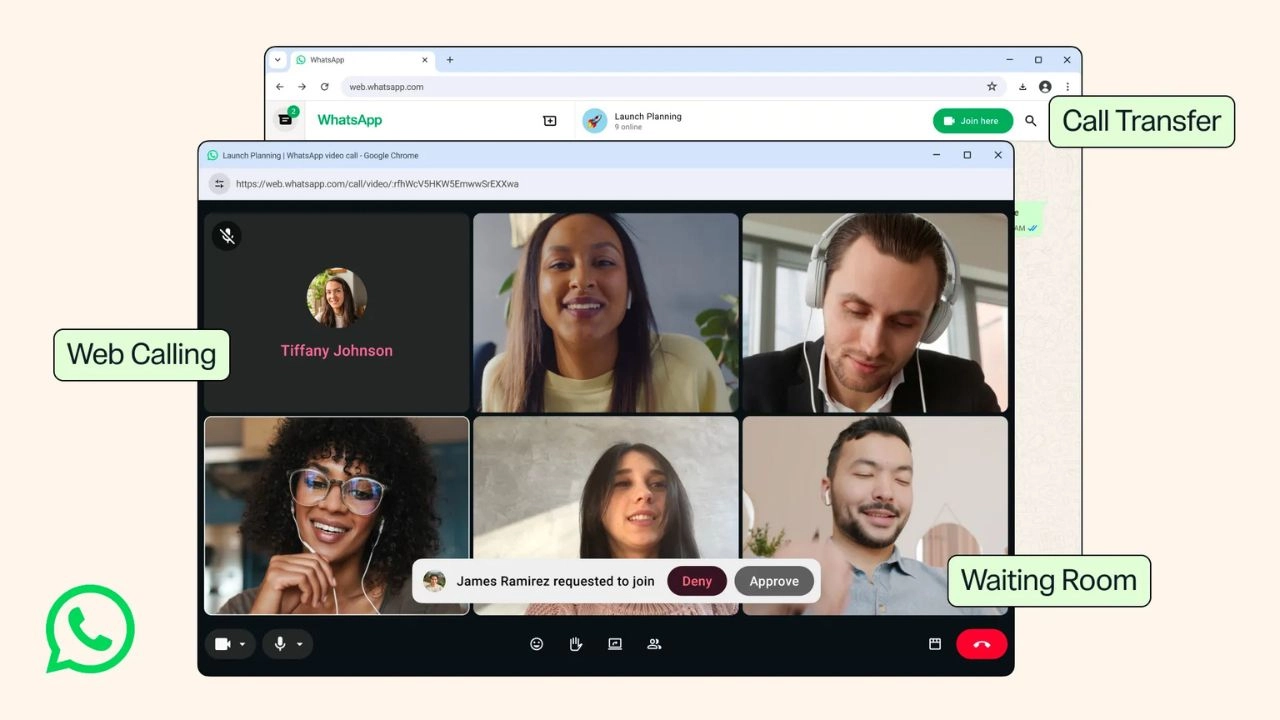
WhatsApp calling just got a nice upgrade. WhatsApp now allow new calling features straight from your web browser. No app download needed at all.
This matters if you share a computer. It also matters if you use a work laptop that blocks new apps. Or maybe you just like calling from your desktop. Either way, you no longer need to switch devices to stay connected.
Calling has become a big part of how people use WhatsApp. Families use it to stay in touch across countries. Coworkers use it for quick check-ins instead of long meetings. So any change to calling tends to affect a lot of people at once.
Let’s look at what’s new.
WhatsApp Web Calling: No App Needed
This is the main update, and WhatsApp shared the details in its official blog post. You can now make and receive calls right from WhatsApp Web. That includes audio calls, video calls, one-on-one chats, and group calls too.
So if you’re a student on a shared computer, this is for you. Or maybe you work on a laptop that won’t let you install new apps. Either way, you can simply open your browser. Then you join the call, just like that.
Here’s what you get with Web Calling:
- Audio and video calls, alone or in a group
- Screen sharing and reactions, just like on your phone
- A full Calls tab with your call history and favorites
- Private, locked calls, so nobody else can listen in
- No time limits and no extra cost
In short, calling on the web now feels just like calling on your phone. Nothing important gets left out.
This should also help people who travel a lot. Say your phone battery is low, or you left your charger at home. You can still hop on a call from any browser instead. Even a hotel computer or a friend’s laptop would work.
Call Transfer: Move Your Call Between Devices
Have you ever started a call on your phone? Then wished you were on a bigger screen? That’s what Call Transfer fixes.
With this feature, you can move a live group call from your phone to your laptop. And you never have to hang up first. So say you start a call on the go. Once you get home, you can shift it to WhatsApp Web or Desktop in seconds. Or you can do it the other way too, moving from your laptop back to your phone.
This helps anyone who works across a few devices each day. Instead of ending a call and starting over, you just keep talking while the screen changes.
Think about a parent on a work call who needs to start dinner. Or a friend group chatting on the train who then reaches home. In both cases, the call just follows you along.
Waiting Room: You Decide Who Joins
Group calls can feel messy when people join with no warning at all. That’s why WhatsApp built a Waiting Room.
Here’s how it works. You create a call link and turn on “Require approval to join,” a setting you can read more about in WhatsApp’s help center. After that, anyone who clicks the link has to wait until you let them in. This way, you get to pick who joins, and when.
It’s a small change. But it helps a lot when you host bigger group calls. Think of a class project, a family event, or a work meeting.
QuickHD: Sharp Video From the Very Start
Nobody likes waiting for video to get clear once a call starts. QuickHD fixes that. It gives you sharp, HD video within the first few seconds of the call.
So your calls should look sharp right from the start. No more staring at a blurry screen while it slowly catches up.
Noise Suppression: Less Background Noise
Are you calling from a noisy spot, like a busy café or a loud street? Noise Suppression was built for that. It filters out the noise around you, and it pairs well with WhatsApp’s new microphone mode for iOS. Together, the two should make your voice come through clearly, even in a loud place.
Better still, you can turn this on or off anytime. Just open your in-call settings. So if you move somewhere quiet, you can switch it off again.
Why This Update Matters
Together, these changes make WhatsApp calling feel more open and easy. You’re no longer stuck on one device. Plus, you get more say over how your calls work.
For example, students and remote workers should notice this right away. So should anyone who splits time between a phone and a laptop. Meanwhile, hosts of group calls get more control over who joins. And everyone gets clearer video and sound, no matter the device.
These features are rolling out in stages. So not everyone will see them at once. Still, they should reach all users soon. Once they do, calling on WhatsApp should feel simpler. It won’t matter which device you happen to be using.
WhatsApp is already one of the most used calling apps in the world. Millions of people use it every day, on phones, tablets, and laptops. So updates like these matter more than they might seem at first. More people now work and study on shared computers or locked-down laptops. Browser calling was likely overdue for a lot of them.
Now that it’s here, it should make everyday chats a bit smoother. That’s true whether it’s a quick one-on-one call. Or a bigger group call with family, friends, or coworkers. Either way, staying in touch just got a little easier.
None of these updates need any setup work from you. Once your account gets the new version, the features should just appear. So there’s nothing extra to download, and nothing extra to configure. You just open WhatsApp, on your phone or in your browser, and the new options should be sitting right there waiting.