
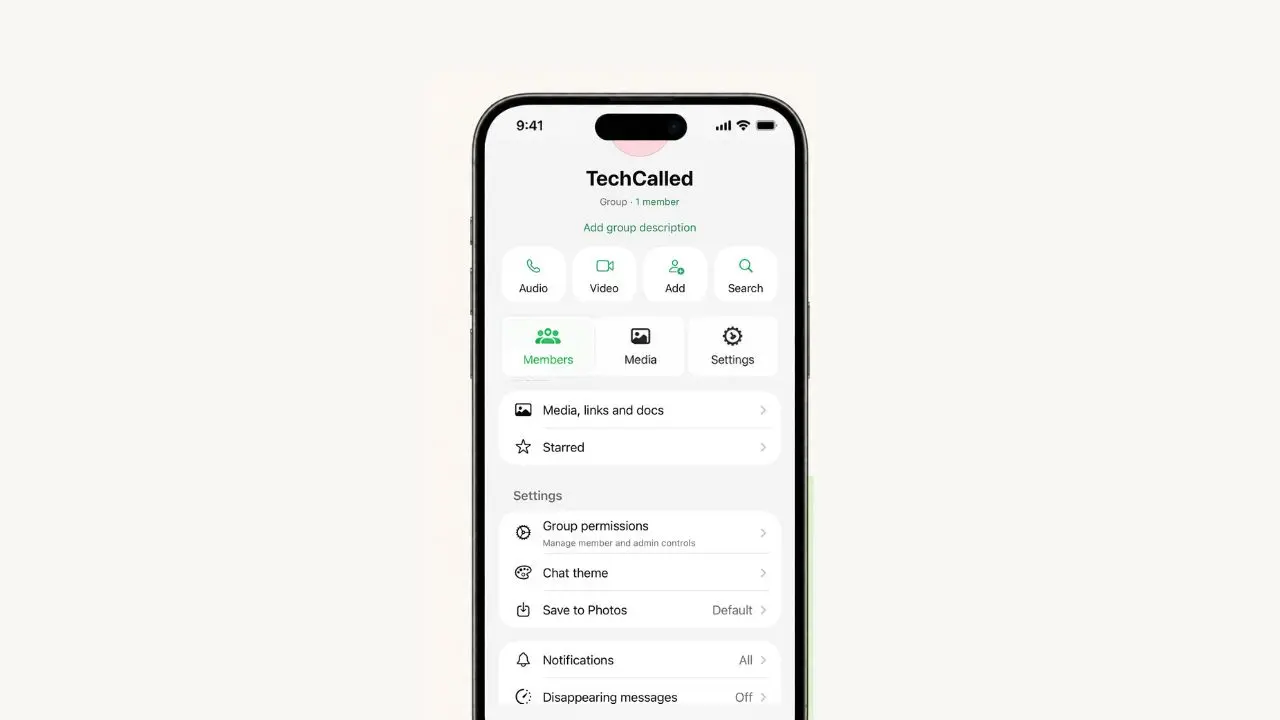
WhatsApp is changing the group info screen on iPhone. The app now splits this screen into three tabs. So you won’t need to scroll and scroll to find a setting anymore. This same look already came to Android last month. Now it’s showing up for iPhone beta testers on TestFlight. The change is small, but it could save you real time every day, especially in busy groups.
What’s new on the group info screen
The new screen has three tabs. They are Members, Media, and Settings. Each tab holds one type of info. So you always know where to look. Before this change, everything sat in one long list. That made it hard to find things fast.
Here’s what each tab covers:
- Members: everyone in the group, plus their role
- Media: shared photos, videos, links, and files
- Settings: group rules, alerts, and privacy options
The Members tab shows who is in the group
The Members tab sits at the top now. It shows every person in the group. You can see their name and photo too. Admins get a small label. This helps you spot them fast. You can also tap a name to see their profile. Or you can start a chat with them right away. Because of this new tab, it’s quick to find one person, even in a big group.
The Media tab keeps shared files in one place
The Media tab holds two things that used to sit apart. These are shared media and kept messages. Before, both sat near the top of the old screen. They were mixed in with other options too. Now, they live under one tab instead. You can still tap either row to see more. So nothing about how they work has changed. The tab just gives them their own spot.
The Settings tab brings the rest together
The Settings tab holds group rules, alerts, and privacy tools. Before, these options sat all over the screen. Now, they live in one place. WhatsApp recently added a green dot feature for online status on iOS too, part of the same push for cleaner screens. You still tap each option to open it, so nothing about how they work has changed.
Why this update matters
Big group chats can feel messy. This is true once a group grows past a few dozen people. Think about a family group with fifty people in it. Or a work chat with dozens of coworkers. Finding one setting in the old design took real effort. You had to scroll past names, media, and links just to reach it.
That’s why WhatsApp built this new layout. The goal is simple: less scrolling, less guessing. Instead of hunting through one big list, you can jump right to the tab you need. This may seem like a small change. Still, it makes daily use a lot smoother. That’s especially true if you run a busy family group or a work chat.
It also brings iPhone closer to Android. Android got a similar layout in a recent beta update. WhatsApp has been busy on that side too, with new Android tablet support in testing right now. So soon, group chats may feel the same no matter which device you pick up.
How to try the new layout early
Right now, only some beta testers can see the new tabs. But if you want to try it early, here’s what helps:
- Join the WhatsApp beta program through TestFlight
- Update to the newest beta build available
- Open any group chat, then tap the group’s name at the top
Even then, the new layout may not show up right away. WhatsApp often rolls out beta features to a small group first. Then, it slowly opens access to more testers over time. So a little patience goes a long way here.
When will iPhone users get this update
There’s no official date yet for a full release. Still, past updates give us a hint. Android users waited a few weeks after their beta before the update went live for everyone. iPad owners have seen fast updates too, now that an iPad can act as your main WhatsApp device. So, if this pace continues, iPhone users could see the full rollout within the next few weeks to a couple of months.
Quick answers about the new group screen
Is this update live for everyone?
No. Right now, it’s only in beta on iPhone through TestFlight.
What are the three new tabs?
They are Members, Media, and Settings.
Does this change what any setting does?
No. It only changes where you find each setting.
When did Android get this update?
Android beta testers got a similar layout last month.
Do you need to update the app to see it?
Yes. You’ll need the latest TestFlight beta build to try it early.
Will this show up in every group you’re part of?
Yes. Once it rolls out fully, it will show up in every group chat, not just the ones you manage.
A quick summary
- WhatsApp’s group info screen now has three tabs: Members, Media, and Settings
- The update is in beta testing on iPhone through TestFlight
- Android users already got a similar layout last month
- The goal is less scrolling and faster access to the tools you use most
This update won’t change what any setting does. It will only change how fast you can reach it. And if you run a big group chat, that alone makes the wait worth it.
This change is also part of a bigger pattern. WhatsApp has been polishing small parts of its design over the past few months. Chat themes, storage tools, and privacy options have all seen small tweaks recently too. This group info update fits right into that trend. Group chats are one of the most used features on the app. So even a small upgrade here reaches millions of people fast, once it leaves beta and goes fully live.